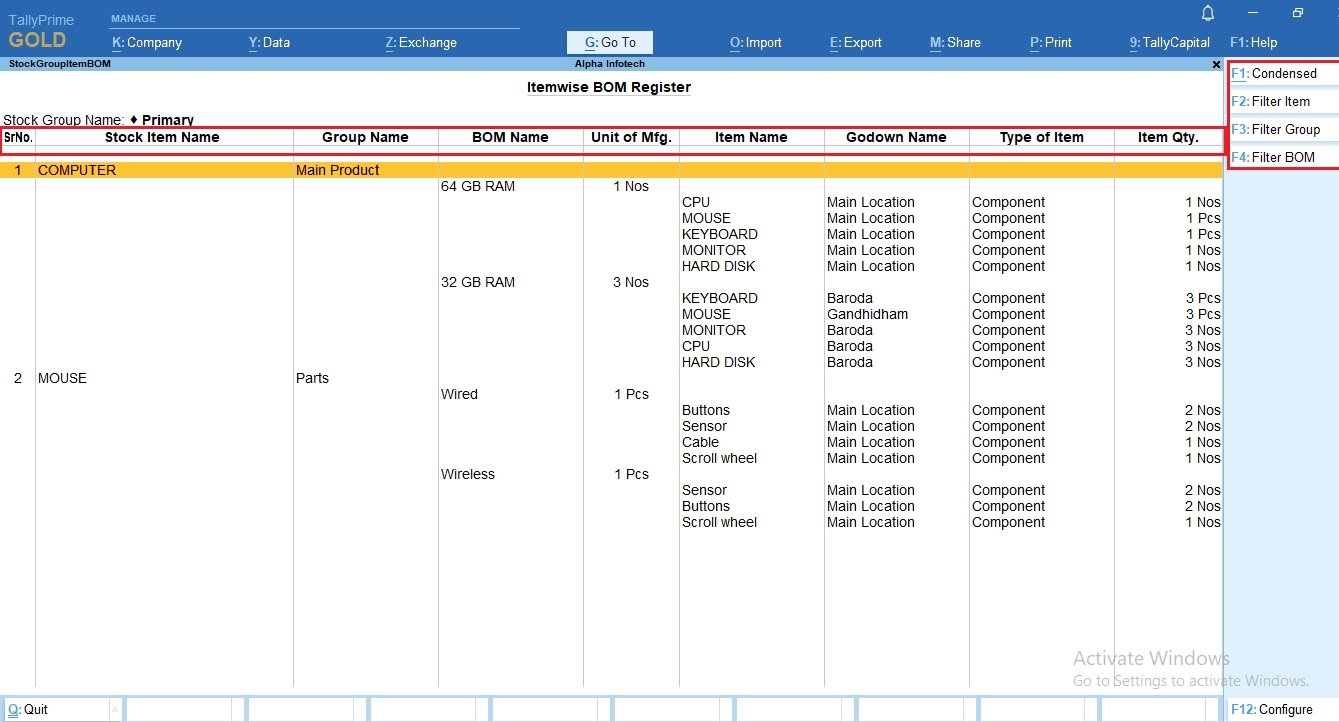
User can define Bill of Materials for stock item in Tally. To view each BOM user has to go inside the Stock Item Master. No single Report is available in Default Tally to view All BOMs in single Screen. This add on facilitates user to View all defined BOMS in Single Screen.Detailed mode gives the option of viewing All Raw materials, Godown, Qty. defined in each BOM.If also lists multiple BOM defined for a single item.User can select required data to be displayed using F12 configuration.
User can define Bill of Materials for stock item in Tally. To view each BOM user has to go inside the Stock Item Master. No single Report is available in Default Tally to view All BOMs in single Screen. This add on facilitates user to View all defined BOMS in Single Screen.Detailed mode gives the option of viewing All Raw materials, Godown, Qty. defined in each BOM.If also lists multiple BOM defined for a single item.User can select required data to be displayed using F12 configuration.